Private Container Registries & OCI Credentials
Deploying proprietary robotics code, physical AI perception models, and enterprise software to edge machines requires pulling container images from authenticated OCI registries.
Admiral provides native credential management for private container registries, ensuring edge devices securely authenticate without embedding secrets into image specs or filesystem configs.
Supported OCI Registries
Admiral seamlessly authenticates with all standard OCI container registries:
- GitHub Packages (GHCR):
ghcr.io - Amazon Web Services (AWS ECR):
{account}.dkr.ecr.{region}.amazonaws.com - Google Cloud Artifact Registry (GCR / GAR):
{region}-docker.pkg.dev - Docker Hub:
docker.io - Azure Container Registry (ACR):
{registry}.azurecr.io - Self-Hosted Registries: Harbor, Quay, Nexus, or internal distribution registries.
Adding Registry Credentials
Registry credentials are created via the web dashboard under Settings > Registry Credentials or via the REST API. Creating, updating, or deleting credentials requires the Edit registry credentials capability (registry.edit), included in the Engineer and Administrator profiles; viewing credentials remains available to all members:
POST /v1/registry-credentials
Content-Type: application/json
X-Organization-ID: {orgId}

{
  "name": "Production GitHub Container Registry",
  "registry": "ghcr.io",
  "auth_type": "token",
  "username": "admiral-deploy-bot",
  "secret": "ghp_xxxxxxxxxxxxxxxxxxxx"
}
Security & Secret Isolation
- Encrypted at Rest: All credential secrets and personal access tokens (PATs) are encrypted at rest using AES-256-GCM.
- Ephemeral Device Token Minting: Devices pulling images receive short-lived, cryptographically scoped pull tokens directly from Admiral Cloud over The Admiral Mesh. Long-term registry secrets are never stored on the edge device's persistent storage.
- Zero Secret Leakage: Registry credentials never appear in plain text in logs, configuration specifications, or edge filesystem dumps.
Attaching Credentials to Workloads
Once registered, attach the credential to your container workload specification in your configuration:
schemaVersion: 1
workloads:
  - name: autonomous-navigation
    image: ghcr.io/org/robotics/autonomy:v2.14.0
    registryCredentialId: "cred_88f9a12c-production-ghcr"
    restartPolicy: always
    hostNetwork: true
When the device receives the workload configuration, the Admiral init supervisor requests a temporary pull grant, authenticates with ghcr.io, pulls and verifies the image layers, and executes the container.
Registry Fallback Through Admiral Cloud
Some sites let a device reach Admiral Cloud but block its container registry (restrictive firewalls, allow-listed egress, private APNs on cellular). With registry fallback enabled on a fleet, devices that cannot reach their registry pull images through Admiral Cloud over the Admiral Mesh instead.
How it behaves:
- The device always tries the registry directly first. It falls back only on a connection-level failure (DNS failure, timeout, connection reset, or TLS error), then keeps using the fallback for that registry for 10 minutes before trying direct again. An HTTP error from a registry the device can reach (for example
401or404) never triggers the fallback. - Works for public and private registries, using the registry credentials attached to the configuration.
- Only the images in the device's current configuration, or images an administrator has pushed to it, are served. Access is read-only.
- Image content is still verified by digest on the device, so the fallback path cannot alter an image.
- Admiral Cloud does not cache image layers: each device's pull is fetched from your registry with that device's credentials.
- Throughput is limited to roughly 8 MB/s per device. Registry fallback is designed to keep devices working on restricted networks, not as a content delivery network.
- OS updates are not delivered through registry fallback.
Enabling Registry Fallback
Registry fallback is off by default and is switched on per fleet. Turning it on requires the Manage billing capability (billing.admin), held by users with the Administrator or Billing manager role. Any member can see whether it is on. Usage (how much data it has delivered) requires the View billing capability (billing.view).
- Open the fleet and go to Deploy > Configuration.
- In the Registry fallback card, switch it on.
- Confirm. The confirmation shows the price for the service before anything is enabled.
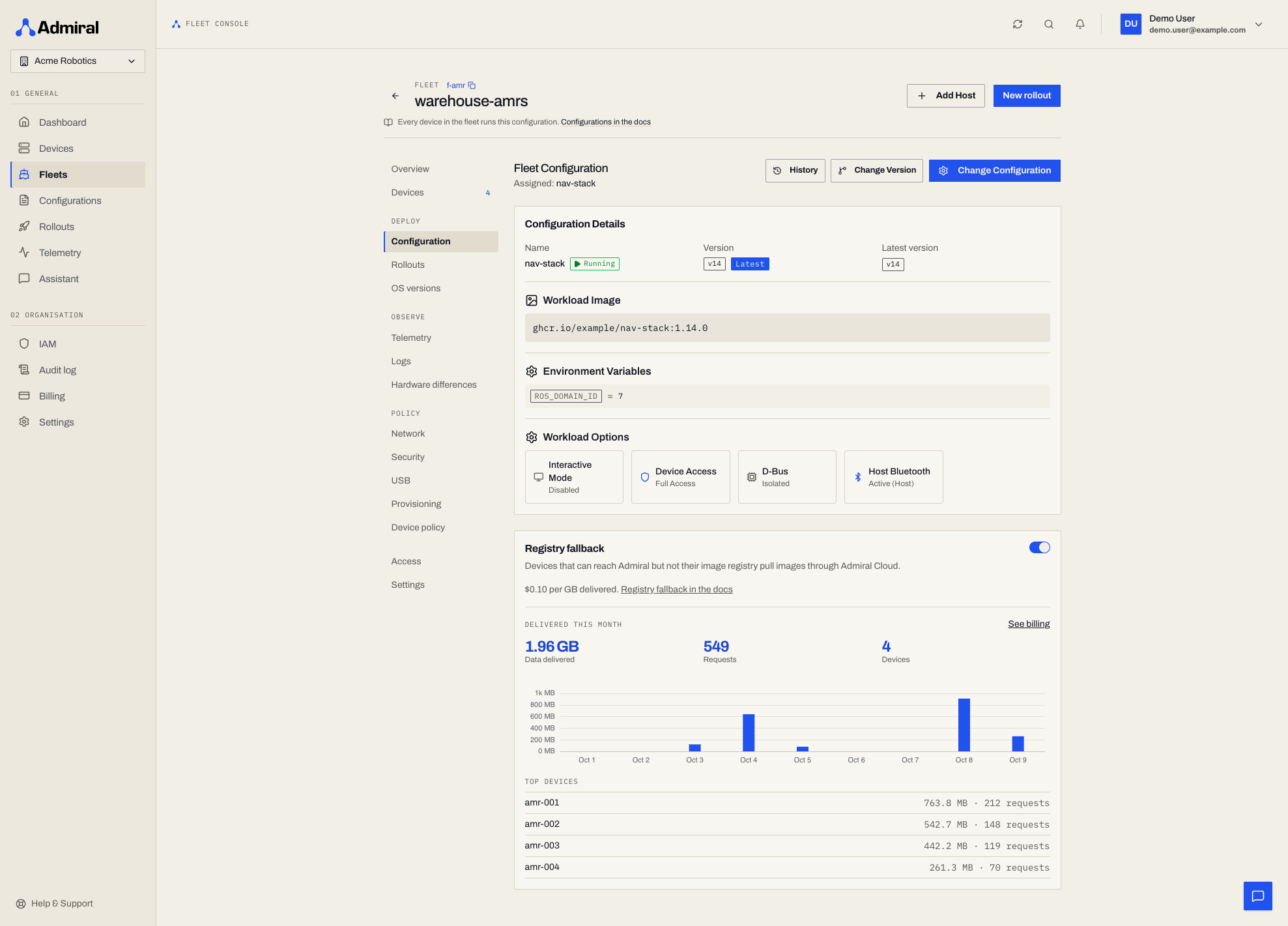
Once it is on, the card shows the data delivered this month and the devices that pulled the most. Switching it off stops serving within 30 seconds.
Using the API
# Check the current state
curl -sS https://api.admrl.co/v1/fleets/$FLEET_ID/image-proxy \
  -H "Authorization: Bearer ***" -H "X-Organization-ID: $ADMIRAL_ORG"

# Enable
curl -sS -X PUT https://api.admrl.co/v1/fleets/$FLEET_ID/image-proxy \
  -H "Authorization: Bearer ***" -H "X-Organization-ID: $ADMIRAL_ORG" \
  -H "Content-Type: application/json" -d '{"enabled": true}'
Use {"enabled": false} to switch it off. The same capability requirement (billing.admin) applies.
Usage
Traffic is metered per fleet. Only image data successfully delivered to devices counts; failed and denied requests are not counted.
In the dashboard, the fleet's Registry fallback card under Deploy > Configuration shows the data delivered this month and the top devices. For the whole organisation, open Billing > Usage, which shows Registry fallback usage with a per-fleet breakdown. Billing > Plan & add-ons shows the price and which fleets have it on, each linking to that fleet's Registry fallback card.
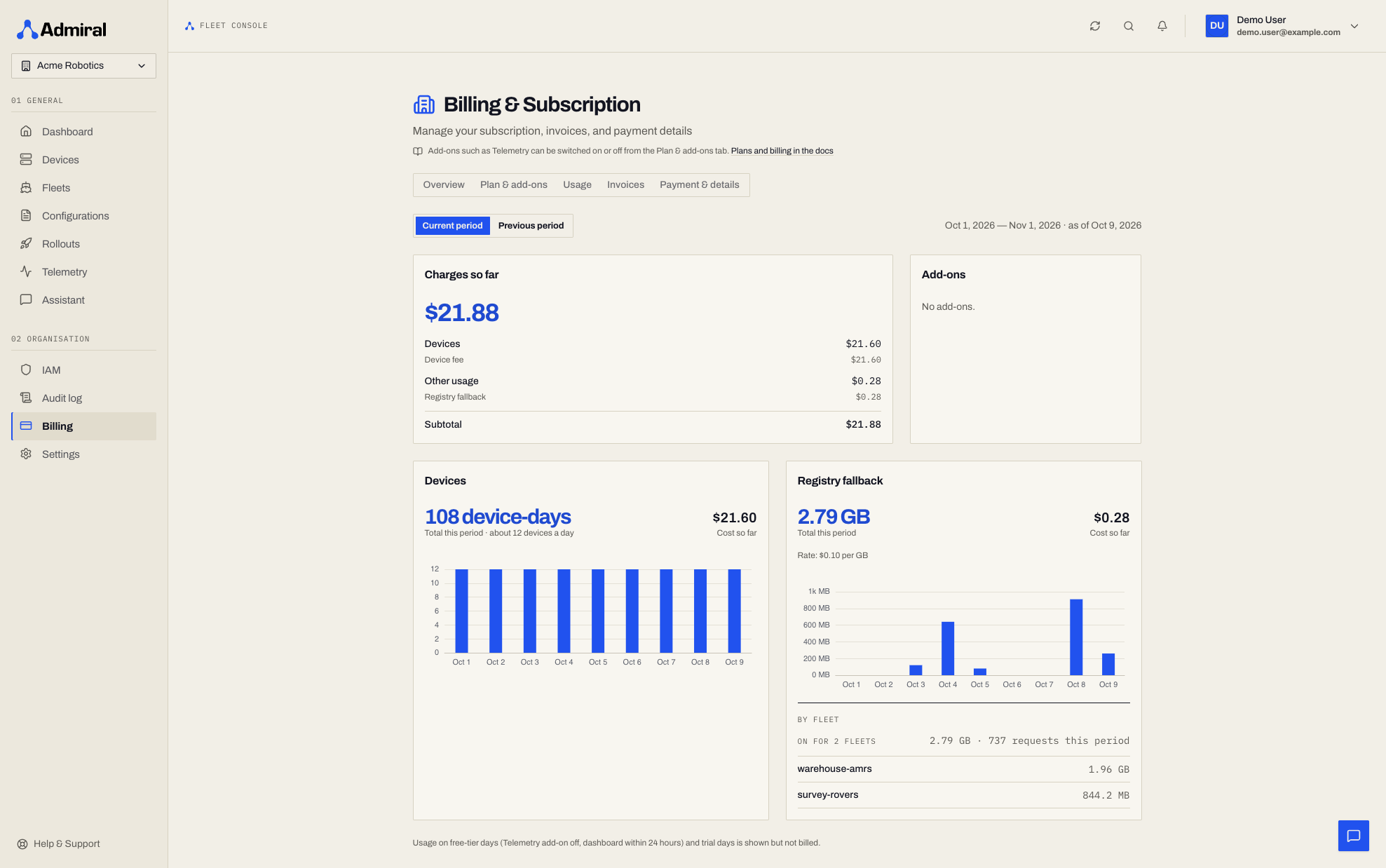
To read the same data from the API, query a single fleet:
curl -sS "https://api.admrl.co/v1/fleets/$FLEET_ID/image-proxy/usage?start=2026-10-01&end=2026-11-01" \
  -H "Authorization: Bearer ***" -H "X-Organization-ID: $ADMIRAL_ORG"
The response contains totals (bytes, requests, devices; cache_bytes is always 0), a daily breakdown, and the top 200 devices by traffic. Periods are whole UTC days, end is exclusive, the default is month-to-date, and the maximum period is 366 days.
Or query every fleet in the organisation at once:
curl -sS "https://api.admrl.co/v1/billing/registry-fallback?start=2026-10-01&end=2026-11-01" \
  -H "Authorization: Bearer ***" -H "X-Organization-ID: $ADMIRAL_ORG"
The response lists each fleet with whether registry fallback is on and the data it delivered, plus organisation totals and a daily series. The start and end parameters work as above.
Billing
Registry fallback is billed on usage, per GB of image data delivered to devices.
- Only data that is successfully delivered counts. Failed and denied requests are not billed.
- The charge appears on your invoice as Registry Fallback Data Transfer.
- Nothing is charged while a fleet has it off, or while its devices reach their registry directly.
- The price is on the pricing page and is shown in the confirmation when you switch it on and in Billing.
- Switching a fleet off stops new charges within 30 seconds. Data already delivered is still billed.
See Plans & Billing for how this fits with other add-ons and usage-based services.